A faster way to read on Mac
Listen to text—even when it’s in a screenshot.
Select text, or copy text, code or a screenshot. Press Option-A and a popup reader opens with live word tracking, click-to-seek and speed controls from 0.5x to 4x.
Coming soon: £4.99 once in the UK. No subscription, licence key or account · local prices shown by Apple · macOS 13+
Mac app — requires macOS 13+
Interactive browser demo. The installed app requires macOS 13 or later. Click Play to try the browser demo.Tap Play to try the browser demo. You can also click any word on this page to start there, or highlight a passage and press Option-A. Use the floating controls to change voice or speed.
On-device audio: the Mac app uses Apple's built-in on-device speech synthesis and does not send reading content to a generative-AI voice service.
Watch it replay: the pointer jumps back to an earlier word and speaks it again. Click any word to do the same. On a Mac, ⇧, slows down and ⇧. speeds up.
I initially wanted help reading and it has now transformed the speed in consuming text.
See the real Mac app
One shortcut. Three ways to use it.
Highlight
Select words in almost any Mac app and press ⌥A. macOS asks once for Accessibility so the app can retrieve what you highlighted.
Copy
With nothing selected, it reads the text already on your clipboard.
Screenshot
Copy a screenshot and it recognises and highlights the words on the image.
Stay in control
Click any word to jump there, scrub progress and change speed from 0.5× to 4×.
Private by design. The Mac app’s speech and screenshot recognition run on your Mac using Apple’s local frameworks. The App Store copy makes no network requests. Existing website copies have separate optional companions described in the privacy policy.
Mac first. The Mac app is the initial release. The iPhone sharing app is still under development and will come later.
Mac first. iPhone later.
The Mac app is the first release. The iPhone app is still under development and is planned for later, not for the initial launch. It is being designed around the same word-by-word highlight, seek by tap and speed control, with optional private Mac playback through Tailscale once that work is ready.
Anything Aloud for Mac
Highlight anything, anywhere on the Mac, and press ⌥A. The floating reader speaks it with karaoke highlighting; a screenshot on the clipboard is recognised on-device and read off the image itself; copied text is the automatic fallback when nothing is highlighted.
£4.99 once in the UK App Store · macOS 13 or later · Apple silicon or Intel
Anything Aloud for iPhone
The phone app already has the same on-device reading, word-by-word highlighting and tap-to-seek. Its start screen is built around four immediate actions:
From Safari, Chrome, Photos or Files, tap Share and choose Read with Anything Aloud. It can begin inside the Share Sheet or continue in the full app for a long document.
Working development build · device testing and App Store release still to come
The planned optional Mac playback will be direct and private: text will travel only between your two devices through your Tailscale network. That phone-to-Mac work is part of the later iPhone release, not the first Mac launch.
How the Mac app works
There is no copy step to remember. With one macOS Accessibility permission, Anything Aloud retrieves the selection you already made and sends it straight to the reader.
Highlight anything
Select text in any app — the browser, Mail, Slack, a PDF, the terminal. Or copy a screenshot instead; that works too.
Press Option-A
Anywhere on the Mac. Anything Aloud asks the frontmost app for your current selection and starts reading at once.
Read along, at your speed
A compact floating window speaks and highlights. Click any word to jump there, drag to scrub, and take it anywhere from 0.5× to 4× mid-sentence.
It reads screenshots — on the picture itself
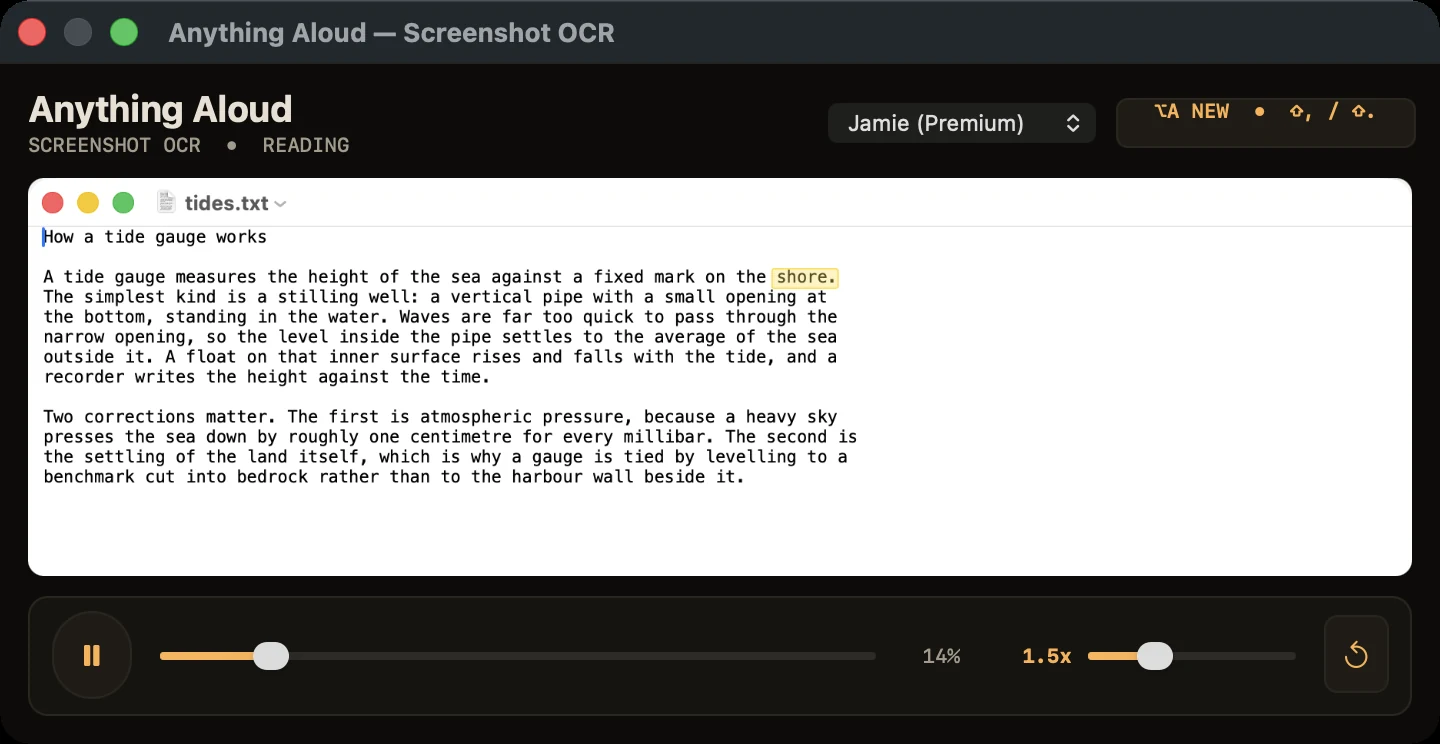
Some text cannot be selected: a menu, a dialog, a frame of a video, a locked PDF. Screenshot it to the clipboard (⌃⇧⌘4, then drag), press ⌥A, and the words are recognised on your Mac and read aloud — with the highlight moving over each original word, in reading order, right on the image.
Recognised on your Mac
The text is lifted from the image by Apple's on-device Vision framework. The screenshot and every recognised word stay on your machine.
The image stays visible
You are not shown a wall of extracted text. The picture stays put and the highlight travels across it, so you always know exactly where the voice is.
Same window, same controls
Click a word on the image to jump there. The same speed slider and the same voice as everywhere else.
One voice, one keystroke, everywhere on the Mac
The Mac app captures ordinary selected text, falls back to copied text and recognises copied screenshots. Whatever route you use, the same floating reader gives you the same voice, speed and word highlight.
Highlighted text
Highlight in Mail, Notes, Preview or a browser, then press Option-A. The reader starts with the selection you already made.
Copied text
If nothing is highlighted, Option-A reads the text already on the clipboard instead. Your clipboard stays intact.
Screenshots
An image on the clipboard is recognised on-device and read aloud, with the highlight moving word by word over the original picture.
Browsers and PDFs
Select text normally, or copy it when a page does not expose its selection. Both routes use the same reader and controls.
Doesn't the Mac already do this? It does — Option-Escape has spoken the selection for years, and it can highlight words and change speed from a small controller. If that is all you need, use it. It is free.
What took the work is everything around the voice: one reader for highlighted text, copied text and screenshots; karaoke highlighting that survives a speed change; and a window that shows you where you are and lets you click your way around the text. That convergence is the product.
Built to be read along with
Karaoke that behaves
The spoken word is lit in yellow with the sentence tinted behind it and a dimmed trail behind that — and it stays vertically centred as the text scrolls, on a smooth glide rather than a jump.
Enhanced or Premium voice required
Anything Aloud reads with an Apple Enhanced or Premium voice installed on the Mac. During first-run setup it checks for a compatible voice and, if one is missing, explains what is needed and opens the correct Apple settings page for the free download.
Markdown, read properly
Copied Markdown is rendered before it is read, so you hear the sentence — not “hash hash asterisk asterisk”.
Fully in hand
Click a word to seek. Drag the progress bar to scrub. Nudge the speed with ⇧. and ⇧,. Change voice mid-read and it resumes from the current word.
Private by construction
Speech and screenshot recognition both run on your Mac using Apple's own frameworks. There is no reading account, no cloud speech server and nothing to activate. The later iPhone app is planned to use a private Tailscale connection only when you choose paired Mac playback.
Out of the way
A small speaker in the menu bar; a floating window that appears when called and closes when done. Closing it stops the speech — no hunting for a stop button.
One purchase. No subscription.
Anything Aloud for Mac is coming to the UK Mac App Store for £4.99, paid once before download. When it launches, Apple will show the price for your region before purchase. There is no account to make, licence key to enter or subscription to manage. The App Store installs the app and handles updates.
Mac app — requires macOS 13+ — Apple silicon and Intel
What Anything Aloud checks during setup.
- Permission to read highlighted text. macOS calls this Accessibility. The app asks on first run and opens the right settings page for you. Without it, Option-A reads what you have copied instead of what you have selected.
- An Apple Enhanced or Premium voice. These are free from Apple. During first-run setup the app checks for one, and if your Mac needs the download it explains it, opens the correct Apple settings page and notices the voice when you return. The app refuses to read in a compact voice on purpose: it sounds bad enough that people conclude the app is broken.
- macOS 13 (Ventura) or later. Supported on both Apple silicon and Intel Macs.
Try the interaction first. Test the browser demo at the top of this page without installing anything.
Why a small one-time price?
I want the Mac reader to be easy to buy and keep. The App Store price is a single purchase, with the Mac features included and no ongoing charge. Anything Aloud does not require an account or collect what you read. The privacy page explains what the site and app do and do not record.
Anything Aloud Ltd (company 17390985, registered in England and Wales, registered office 71–75 Shelton Street, Covent Garden, London, WC2H 9JQ, United Kingdom, support@anythingaloud.com) makes and publishes the app.
From the App Store to your first read
Three steps to start reading on your Mac. The Mac App Store version focuses on the Mac reader; it does not include the separate Chrome and VS Code companions.
Get the Mac app
When the Mac App Store release is live, Apple will show your local price before purchase and install the app into Applications.
Open Anything Aloud
Launch Anything Aloud from Applications. A short welcome screen explains the menu-bar speaker.
Allow access and press Option-A
Allow highlighted-text access when macOS asks, select words in almost any app and press ⌥A. If nothing is selected, it reads copied text or a copied screenshot.
System requirements
Everything you need to get up and running:
- An Apple Enhanced or Premium voice. The guided first-run setup checks this for you. If your Mac has only the compact system voice, Anything Aloud explains what is missing, opens the correct Apple settings page for the free download and notices the new voice when you return.
- macOS 13 or later, on Apple silicon or Intel. Earlier versions of macOS cannot run it.
- Accessibility for the Option-A shortcut. It lets Anything Aloud send Command-C to the app in front. You grant it once, when macOS asks. Decline it and the app still reads copied text or screenshots; the Services menu can read selected text.
- Start at Login is optional. The app offers the toggle after foreground onboarding, and you can change it from the speaker menu at any time.
- Nothing else for the Mac reader. No Screen Recording, no microphone, no licence key, and no Anything Aloud account or sign-in. Its reading, screenshot recognition and Apple speech stay on the Mac. The App Store copy makes no network requests and is updated through Apple.
- The iPhone app is not part of this release. It is still under development. Exact requirements will be published when it is ready for the App Store.
What this release is
The release is the Mac app: macOS 13 or later, Apple silicon or Intel, distributed through the Mac App Store. The iPhone app is still under development and will come later. There is no waitlist and no mailing list.
The short version
When can I download it?
The Mac version is coming to the App Store at a one-time £4.99 UK price. After launch, install it from the App Store, allow highlighted-text access and press ⌥A. There is no key to paste or subscription to renew. The iPhone app is still under development.
Do the Mac and iPhone apps work together?
That is planned for later, not for the initial release. The iPhone app is still under development. The design pairs it through Tailscale so a passage on the phone can play through the Mac reader whilst the phone mirrors the live highlight.
It is designed as a direct device-to-device connection, not a cloud account.
Why does it need the Accessibility permission?
Because reading whatever you highlighted without a separate copy step requires the app to retrieve the current selection from the frontmost app. macOS requires an explicit Accessibility grant for that cross-app action, and that is the right default.
You grant it once, when the app asks. It is the only permission requested: no Screen Recording or microphone. Reading itself needs no network at all; the later optional iPhone-to-Mac feature is designed to use your private Tailscale connection. Decline Accessibility and the Mac app still works: it reads whatever is already on the clipboard.
Where does my text go?
The Mac app keeps your reading content on your Mac. Speech uses Apple's on-device voices, and screenshot recognition uses Apple's on-device Vision framework. Text, screenshots and recognised words handled by the Mac reader stay on your Mac. There is no Anything Aloud reading account or reading server on the other end, and nothing to sign in to. The bundled companions use local speech by default and also offer clearly labelled optional Google, OpenAI and Claude-account routes; the privacy policy explains exactly what each choice sends. Ollama remains local.
The iPhone app is still under development. Its privacy design keeps extraction and speech on the phone, and uses your private Tailscale network for optional Mac pairing; those claims will be verified again before that later app is released.
What is the catch?
No advertisements, telemetry in the app, upsell or account. The one-time price is shown before you buy in the Mac App Store. Speech and screenshot recognition run on your Mac.
Doesn't macOS already read text aloud for free?
Yes — Option-Escape speaks the selection, and it is genuinely free. It can also highlight words and show a small controller for speed and skipping. If that covers your needs, use it.
Anything Aloud exists for reading you actually follow: a visible reader with word-by-word highlighting that survives speed changes, click-to-seek, speeds up to 4×, and one keystroke for highlighted text, copied text and screenshots. The voice is the commodity; the reading is the product.
Doesn't ChatGPT already read answers aloud?
Yes. ChatGPT's own Read Aloud speaks a response in ChatGPT's voices. Anything Aloud is for when you want to follow along: each word lit as it is read, click any word to hear it again, and speed from 0.5x to 4x. It uses your Mac's voices, and the same reader works on text copied from any app.
Are browser or editor extensions included?
Not in the Mac App Store version. Apple's sandboxed copy contains the Mac reader but no Chrome or VS Code companion or local bridge. People who already installed the separate website version can keep using its companions and signed updates; see support for that version.